Photographer Business Card Template
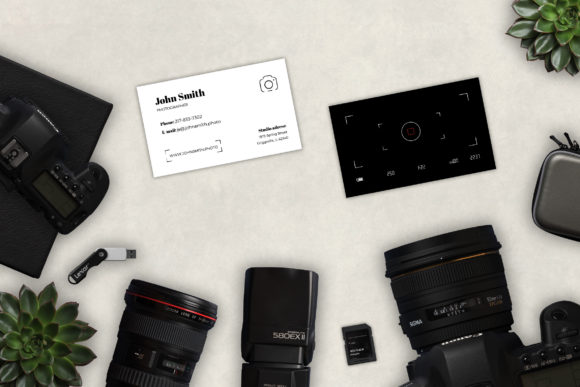
A well-designed business card is more than a piece of paper—it’s a tactile extension of your brand, a quick visual handshake that reinforces credibility and recall. For photographers, where first impressions hinge on aesthetic precision and professional clarity, the Photographer Business Card Template serves as a foundational asset in client acquisition, networking, and consistent branding. This isn’t just another design file: it’s a production-ready resource built for real-world use—PSD layered, vector-compatible, print-optimized at 300 DPI CMYK, with 0.25-inch bleed and a standard 2 × 3.5 inch card size. It includes free fonts and clear font documentation in a .txt file, removing guesswork from typography setup.
Where It Fits in Your Photography Workflow
The Photographer Business Card Template enters your process not as an afterthought—but as a deliberate touchpoint in three key phases: preparation, engagement, and follow-up. Before a shoot or meeting, having printed cards on hand signals readiness and professionalism. During events, gallery openings, or client consultations, handing over a physical card creates a moment of presence—something digital contact sharing often lacks. After delivery, including a card with your final gallery or invoice reinforces your identity and makes re-engagement frictionless.
Unlike generic templates, this one is built for photographers’ specific needs: space for portfolio URLs (not just websites), optional social media icons aligned with visual platforms like Instagram or Behance, and clean hierarchy for name, title, and contact details without crowding. The PSD structure separates layers logically—logo placeholder, background texture, text blocks, QR code zone—so edits stay surgical, not disruptive.
Integration With Your Existing Tools and Systems
You don’t need to overhaul your workflow to use the Photographer Business Card Template. It slots cleanly into common systems: pair it with Canva for quick mockups, Adobe InDesign for multi-card layouts or batch printing, or Illustrator for scaling logos or adjusting vector elements. Because it’s CMYK and bleed-ready, it moves directly into most commercial print workflows—no color shifts or trimming surprises. If you use project management tools like Trello or Notion, store the template file alongside your brand guidelines and vendor contacts so it’s always accessible when prepping for a new client launch or seasonal refresh.
It also complements digital assets. Use the same font pairing from the included .txt file across your website headers, email signatures, and social bios. Match the card’s accent color to your Lightroom preset UI or website CTA buttons. Consistency across physical and digital surfaces builds subconscious recognition—clients see your name, then your card, then your site, and register them as belonging to the same trusted source.
Practical Editing and Production Tips
Start by replacing the placeholder logo—not just pasting in your file, but checking resolution and alignment. Vector logos scale cleanly; raster versions should be at least 300 DPI at full size. Next, verify contact details: include only what you actively monitor. A cluttered “info dump” (e.g., five email addresses, three phone numbers) dilutes focus. Prioritize one primary method per channel—email for formal inquiries, Instagram DMs for casual outreach, phone for urgent bookings.
QR codes are optional but highly effective. Link yours directly to your latest portfolio page—not your homepage—so recipients land on strong, recent work. Test the code on multiple devices before printing. And remember: white space isn’t wasted space. The template’s balanced margins and breathing room aren’t decorative—they ensure legibility at arm’s length and prevent ink bleed on textured stock.
If you’re ordering prints, communicate clearly with your vendor: confirm they’re using CMYK (not RGB), that the 0.25-inch bleed is preserved, and that they’re applying appropriate trapping if your design includes fine lines or overlapping colors. Most reputable labs accept PDF/X-1a files exported from Photoshop or Illustrator—just flatten layers only after final review.
Long-Term Usability and Brand Evolution
A good template endures because it adapts. As your photography practice grows—shifting from weddings to commercial work, adding drone services, or launching workshops—the Photographer Business Card Template supports evolution without replacement. Swap out taglines (“Candid Wedding Photography” → “Commercial Visual Storytelling”), adjust iconography (film strip → drone icon), or revise color accents—all while preserving structural integrity and print compliance.
Store versioned copies: “Card_v2_Weddings_2024”, “Card_v3_Commercial_2025”. This avoids confusion during busy seasons and simplifies audits if you ever revisit design choices. Also, keep a plain-text backup of all contact info and font names outside the PSD—useful if software compatibility changes or you switch editing platforms.
Efficiency Without Sacrificing Quality Control
Time saved in design shouldn’t come at the cost of accuracy. Build quality checks into your process: zoom to 200% to inspect kerning and alignment; toggle layer visibility to isolate background textures from text; export a low-res PDF for quick team review before sending to print. If you work with assistants or second shooters, share a simplified version of the template with locked layers—only editable fields exposed—to maintain consistency across team cards.
Print a single test copy on your home printer first—even if it’s not CMYK-accurate, it reveals layout issues invisible on screen: awkward line breaks, clipped corners, or misaligned QR codes. Then order a press proof from your lab. Yes, it adds a day—but prevents costly reprints when 500 cards arrive with a typo in your studio address.
Real-World Use Cases Across Photography Niches
- Portrait photographers use the template to highlight session types (“Senior Portraits • Family Sessions • Headshots”) and link QR codes to booking calendars—reducing back-and-forth emails.
- Real estate photographers add MLS ID or local association badges in the footer, reinforcing niche authority and trust with agents.
- Event photographers print double-sided versions: front with logo and contact, back with a subtle grid of four recent event thumbnails—small enough to fit, impactful enough to spark conversation.
- Educators and workshop leaders replace “Photographer” with “Photography Instructor” and embed a QR linking to their upcoming course schedule or free Lightroom preset download.
Each variation stays rooted in the same template—same dimensions, same bleed, same font stack—so your brand remains cohesive whether you’re handing a card to a wedding planner in Dallas or a gallery curator in Portland.
Making It Part of Your Routine, Not an Exception
Treat your business card like any other operational tool: schedule quarterly reviews. Does your website URL still resolve? Is your Instagram handle current? Has your email forwarding changed? Update the PSD, re-export, and reprint in batches of 100—no need for bulk orders unless demand spikes. Keep a stack near your laptop, in your camera bag, and on your desk. When a potential client asks, “How do I reach you?”, your answer isn’t verbal—it’s a smooth, confident handoff of something tangible, polished, and unmistakably yours.
The Photographer Business Card Template doesn’t replace strategy or skill. But it does remove friction from execution—freeing you to focus on what matters most: capturing moments, building relationships, and growing your practice with intention.